NO. 01 — WEBCAM WORKSMAC APP STORE · v1.0

Webcam control
for Mac.

Webcam Works gives you USB camera controls, virtual camera output, recording, presets, and automations in one macOS app.
Download on the Mac App Store 14-day free trial · $19.99 once · macOS 26 Tahoe
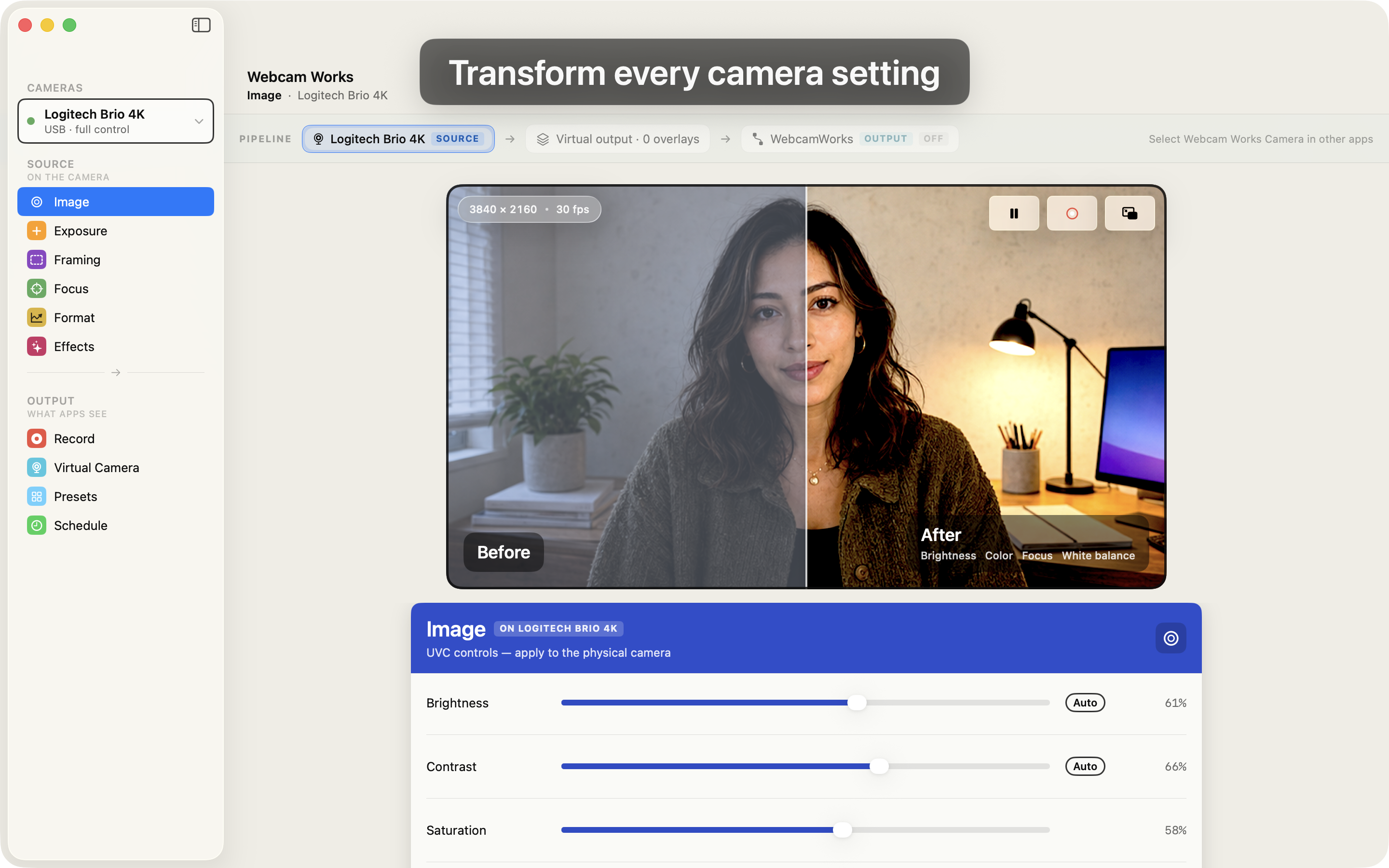
Webcam Works main window showing the Image panel with a before/after camera preview and live brightness, contrast, and saturation controls for a Logitech Brio 4K.
FIG. 01 — MAIN WINDOW · IMAGE PANELBEFORE / AFTER · LIVE UVC CONTROLS
01 — FEATURES

Feature set.

01

Image

Brightness, contrast, saturation, sharpness, and anti-flicker controls.

02

Exposure

Manual exposure, camera auto exposure, Smart Auto-Exposure, exposure time, gain, white balance, backlight compensation, and HDR when supported.

03

Framing

Zoom, pan, tilt, and field-of-view presets on supported cameras.

04

Focus

Manual focus and autofocus controls when supported.

05

Format

Resolution and frame-rate selection, with supported options from the connected camera.

06

Effects

macOS video effect status and Center Stage control where available.

07

Record

H.264 .mov recording with microphone audio, destination selection, status, and recovery for interrupted recordings.

08

Virtual Camera

Camera, screenshare, screenshare with face PiP, and BRB modes for the Webcam Works virtual camera.

09

Virtual Output

Filter adjustments, LUTs, skin softening, background blur/color/image, text overlays, image overlays, and REC indicator overlay.

10

Presets

Named snapshots of camera controls and virtual output settings, with factory presets and generated thumbnails.

11

Schedule

Apply presets by running app or local time window.

02 — COMPATIBILITY

Camera support.

01UVC CAMERASWebcam Works controls standard UVC settings exposed by the connected USB camera.
02VENDOR CONTROLSMapped field-of-view controls for Logitech Brio models, Razer Kiyo Pro, Dell UltraSharp WB7022, and AnkerWork C310. Mapped HDR controls for supported Logitech Brio, Razer, Dell, and AnkerWork models.
03BUILT-IN CAMERASFaceTime HD, Studio Display, iPhone Continuity Camera. These cameras expose Format and Effects instead of the full UVC control set.
04REQUIREMENTSmacOS 26 Tahoe. Apple silicon. Sandboxed and lightweight. Distributed through the Mac App Store.
05MEETING APPSZoom, Meet, Teams, FaceTime, Discord, OBS, and other apps that accept a camera input can use the physical camera or the Webcam Works virtual camera.
03 — PRICE

Pricing.

TRIAL
Free14 days
  • All source and output features unlocked
  • No credit card, no sign-up
  • After 14 days, Exposure stays available
Start trial
ONE-TIME UNLOCK
$19.99one time
  • Camera controls, virtual camera, recording, presets, schedules
  • One-time purchase, no subscription
  • Family Sharing for up to 5 family members
  • All future updates included
Buy on Mac App Store

One-time purchase. No subscription. Refunds are handled by Apple through reportaproblem.apple.com under its standard policy.

04 — FAQ

FAQ.

01What does Webcam Works do?Webcam Works controls supported USB webcam settings on macOS and provides a Webcam Works virtual camera for other apps. It includes source camera controls, virtual output tools, recording, presets, and automations.
02Which webcams does Webcam Works support?Webcam Works is built for UVC-compliant USB webcams. It controls the settings each camera exposes and includes mapped field-of-view and HDR controls for supported Logitech Brio models, Razer Kiyo Pro, Dell UltraSharp WB7022, and AnkerWork C310.
03Does Webcam Works work with Zoom, Meet, Teams, FaceTime, Discord, and OBS?Yes. You can adjust the physical camera for apps that use it, or select the Webcam Works virtual camera in Zoom, Google Meet, Microsoft Teams, FaceTime, Discord, OBS, and other apps that accept a camera input.
04Does Webcam Works upload my camera feed or recordings?No. Your camera feed, microphone audio, and recordings stay on your Mac. Webcam Works does not upload your video or recordings to Lors.
05How much does Webcam Works cost?Webcam Works has a 14-day free trial and a $19.99 one-time unlock through the Mac App Store. There is no subscription.
06 — SUPPORT

Support.

Email us with your Mac model, macOS version, camera model, and the app you are using it with. We read every support note.

hello@lors.ai →